
Everything syncs into a SQLite file on your Mac. No PostgreSQL to provision and no database bill.
DESKTOP / MACOS
Threads analytics on your Mac,no server to run.
Download the app, paste your Threads access token, and the full dashboard runs on your Mac. Posts and follower history are stored in a local SQLite database — no hosting bill, no PostgreSQL, no password to set.
macOS 11+ · Apple silicon · Free and open source
 Threads AnalyticsmacOS desktop appAPPLE SILICON
- macOS 11 Big Sur or later
- A Mac with Apple silicon (M1 or later)
- A Threads access token
- No Node.js, pnpm, or PostgreSQL to install
ON GITHUB RELEASES, DOWNLOAD
Threads-Analytics-x.y.z-macos-arm64.zipIntel Macs aren't supported yet.
Only download the app from this project's GitHub Releases.
01 / THE SAME DASHBOARD
Every chart from the web version, in a native window.
The desktop app runs the same dashboard as the hosted version — all 31 analyses, the posts table, the giveaway picker, and the MCP server — on a local server only your Mac can reach.
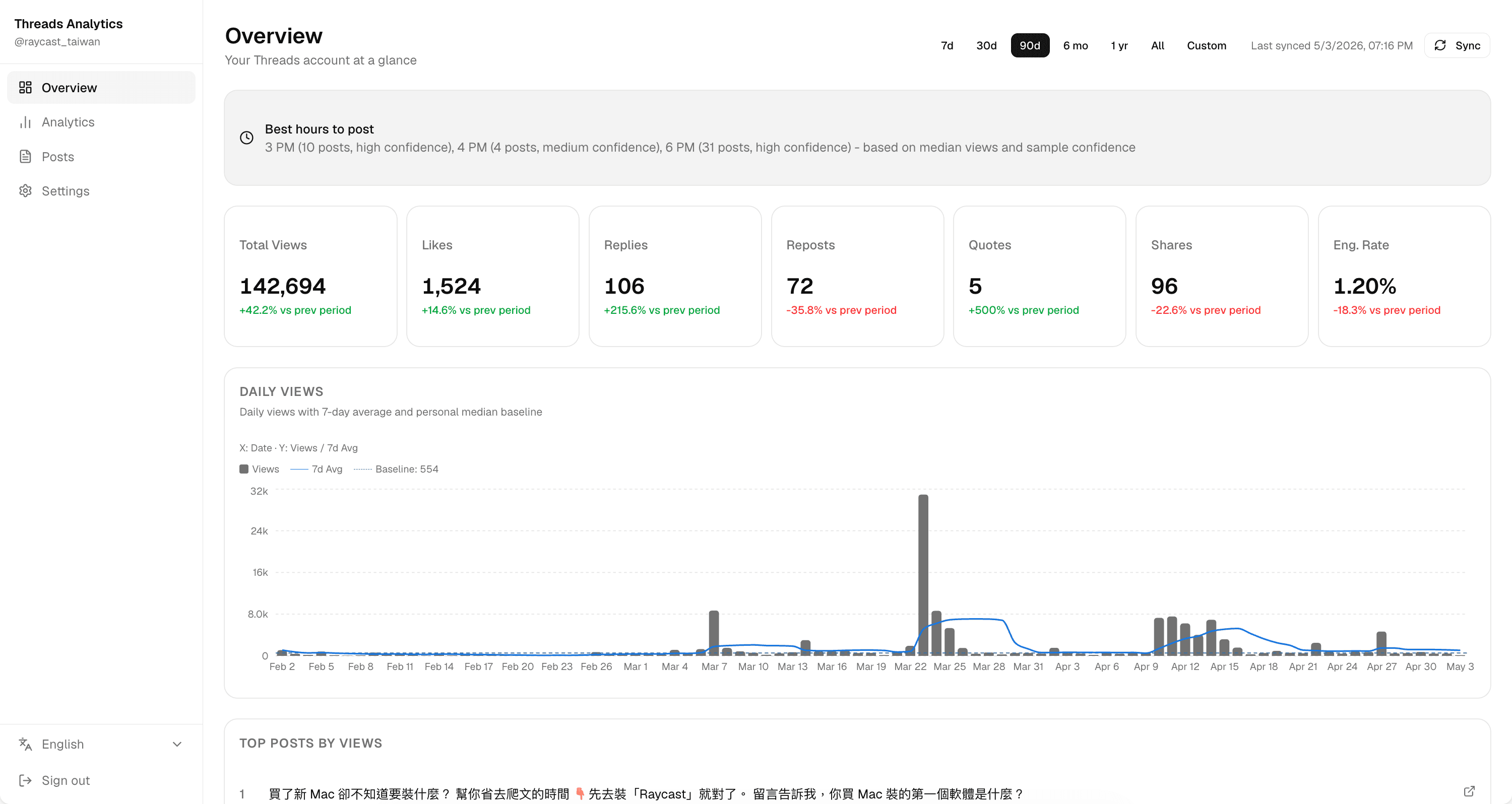
There's no APP_PASSWORD sign-in. The dashboard only listens on your own machine, so the login screen goes away.
The scheduler ships switched on: pick an interval in Settings and the app syncs in the background while it's open and your Mac is awake.
The app checks GitHub Releases and shows a banner when a new build is out. You decide when to install it.
02 / MAC OR SERVER
Pick the version that fits how you work.
Both run the same open-source dashboard. The difference is where it lives — and what that means for syncing, access, and cost.
| Compare | Mac app | Self-hosted web |
|---|---|---|
| Runs on | Your Mac | A server or cloud platform you choose |
| Database | SQLite, stored on your Mac | PostgreSQL |
| Cost | Free | Your hosting and database plan |
| Sign-in | None needed | APP_PASSWORD |
| Auto-sync | While the app is open and the Mac is awake | Around the clock |
| Open it from | This Mac only | Any browser, phone included |
| MCP clients | Agents on the same Mac, like Claude Code | Any client, including Claude's custom connectors |
| Updates | Download each new release | Pull the new image or redeploy |
Sync and the daily follower snapshot only run while the app is open and your Mac is awake: closing the window quits the app, and sleep pauses syncing until the Mac wakes. A day the app never runs gets no follower count, and Threads can't fill it in later — if you need round-the-clock tracking, deploy the web version.
See deploy options03 / INSTALL
Download, drag, open.
No installer and no Terminal. The app is published as a ZIP on the project's GitHub Releases page.
- Download the ZIP
Open GitHub Releases, pick the newest release that lists a macOS ZIP, and under Assets download the file ending in macos-arm64.zip — not the automatic Source code archive.
- Open it in Finder
Double-click the ZIP. Finder expands it into the Threads Analytics app.
- Move it to Applications
Drag Threads Analytics into your Applications folder.
- Open the app
Launch it from Applications. The first launch of each new version needs one extra confirmation — see the next section.
Then connect your account
There's no sign-in password. Once the dashboard opens:
- Open Settings
Select Settings in the sidebar.
- Add your account
Select Add Threads account and paste your access token.
- Wait for the first sync
Your posts start loading right away. How long it takes depends on how many posts your account has.
No access token yet? The token guide walks you through generating one in 18 steps.
Read the token guide04 / FIRST LAUNCH
Allow each new version once.
Releases marked Preview aren't notarized by Apple yet, so macOS blocks the first launch of each version with a message that it can't verify the app. After confirming the download came from this project's GitHub Releases, allow it once:
Allow it in Privacy & Security
- Open Threads Analytics from Applications once, then close the warning.
- Open System Settings → Privacy & Security.
- In the Security section, find the message about Threads Analytics and select Open Anyway.
- Confirm with your password or Touch ID, then select Open.
Open it from the context menu
- In Applications, Control-click Threads Analytics.
- Select Open.
- Select Open again in the confirmation dialog.
Repeat this after every update. Never run Terminal commands from an unknown source to switch off Gatekeeper — if the app still won't open, report your macOS version and a screenshot of the error.
Open a GitHub issue05 / UPDATES & DATA
Updates never touch your data.
Everything the app stores lives in one folder on your Mac, separate from the app itself — so an update is just a matter of replacing the app.
~/Library/Application Support/Threads AnalyticsON THIS MAC
updateUpdating the appA banner appears when a newer release is out, and Settings → About shows your version. Quit the app, download the new ZIP, and replace the copy in Applications — no need to sync again.
dataWhere your data livesThe SQLite database and the key that encrypts your access token sit in this folder. Keep them together: without the key, the stored tokens can't be read.
tokenKeeping your token aliveEach sync renews your Threads access token once fewer than 30 days remain. Open the app at least once a month with auto-sync on so it doesn't lapse.
uninstallUninstallingQuit the app and move it to the Trash. To also erase accounts and synced data, delete this folder — that can't be undone.
mcpConnecting an agentThe MCP server runs at http://127.0.0.1:43127/api/mcp, so agents on the same Mac, like Claude Code, can read your data. Cloud connectors can't reach it.
intelIntel MacsNot supported yet. Releases are built for Apple silicon only.
Put your Threads history on your Mac.
Download the app, paste your token, and your analytics start building up locally. Want it running around the clock instead? Deploy the web version.
Free and open source · Your synced data stays on your Mac